commissioning · 9 min read
What Photo to Send for a Portrait Painting: The Checklist We Use
What photo to send for a portrait painting: the exact checks our painters run before quoting — resolution, light, angle, eyes and crop, with the fix for each.
By Thomas Mark
Send the original file, straight off the phone or camera, of a photograph taken in soft front light at roughly the subject's eye level, with the face sharp and big enough to zoom into. That one sentence covers nearly every commission we take.
This page is the checklist, not the argument. Why the photograph decides more about the finished painting than the size or the price is set out in why the photograph matters more than you think. What follows is the mechanical version: the five checks we run on a reference photo for oil painting before we quote, and the fix for each way one fails.
The five checks, in order
Run them in this order. The first check a photograph fails is the one worth fixing; nothing further down the list will rescue it.
1. Is the face bigger than a thumbnail. Pinch-zoom until the head fills your screen. If it still reads as a face — the edge of the iris, the line where the lips meet, separate strands of hair — the painter has enough to copy. If it dissolves into blocks of colour, the painter is inventing. Roughly 600 pixels across the head is the floor for a single portrait. This check fails most often, and usually because the photograph was shared rather than sent.
2. Is the light coming from the front. An overcast day outdoors is the best portrait light there is, and it is free. Indoors, next best is the subject facing a window with the lights off. Three kinds of light cause most of the trouble: sun behind the subject, which silhouettes the face; midday sun overhead, which sinks the eyes into dark sockets; and on-camera flash, which flattens skin and gives pets glowing eyes.
3. Are the eyes sharp. Zoom to one eye, not the whole face. A portrait is read through the eyes, so a photograph can be soft everywhere else and still paint well if the eyes are crisp. The reverse is not true. Look for the catchlight, the bright reflection of sky or window on the eye — it is what makes a painted eye look alive.
4. Was the camera at eye level. A phone held at chest height and pointed down at a child or a dog gives a large forehead and very little face. Held below an adult's chin it enlarges the jaw and nostrils. The painter cannot correct it, because the distortion is the shape of the face in the reference.
5. Is it the original file. Most low-resolution photographs we are sent began as good ones and lost their detail in transit. The next section covers recovering it.
Subject by subject
What photo to send for a portrait painting shifts with the subject. Each of these has one failure that comes up far more than the rest.
One person. Usually a photograph already cropped tight to the head, often an old profile picture, so the painter has nothing above the crown or below the collar. Send the uncropped original and say in the notes how much of the body you want.
A couple. One leans in and the other sits back, so one face is sharp and the other soft. The best references have both heads the same distance from the lens.
A family. The group shot is taken far enough back to fit everyone in, which makes every face small. Send it for the arrangement plus a close-up of each face, at no extra cost. Size matters too: at 16 × 20″ a family of five gives each face about the width of a thumbnail, which is why our size guide sets minimums by head count.
A dog. Photographed from standing height, so the reference is the top of a head and a nose. Get down to the dog's eye level, use daylight, and take twenty frames to get one with the ears up. Longer method in how to photograph your dog; prices on dog and cat portraits.
A cat. Exposure, particularly with black cats: the phone meters for the bright room and the cat becomes a silhouette with two eyes in it. Shoot near a window in indirect daylight and tap on the cat so the phone exposes for the fur. A washed-out black cat is far more paintable than a correct room with a cat-shaped hole in it.
A horse. Taken side-on across a field, head turned away, from human height. A three-quarter view of head and neck from a mounting block gives the painter the structure of the skull, which is what makes a horse look like that horse rather than a generic bay. Say in the notes if you want the headcollar or rug left out.
A house. Wheelie bins, a car across the drive, and an angled shot from the pavement so the walls lean. An overcast day, square to the front, standing back far enough for the roofline, solves all three.
Phone, camera or scan: what "the highest resolution you have" means
It means the file as it left the camera, not a copy that has been through a messaging app. Can you paint from a phone photo? Yes, and most of what we paint started as one — twelve megapixels is 4,032 pixels wide, more than the painter can use. What ruins it is the journey.
| Where the photo is | What you usually get | What to do instead |
|---|---|---|
| A WhatsApp thread | About one megapixel, re-compressed | Your own camera roll, or ask the sender to attach it as a file |
| A Facebook or Instagram download | Around 1,000 pixels wide | Ask whoever posted it for the file |
| A screenshot | Screen resolution, plus more compression | Go back to the photograph |
| An iPhone with optimised storage | A small proxy until fetched | Share from inside the Photos app |
| A printed photograph | Depends how you copy it | A 600 dpi scan, or a flat daylight photograph |
| A camera roll or memory card | The full file | Send this one |
WhatsApp compresses anything sent as a photo but leaves a document attachment untouched, so asking a relative to send the file rather than the picture recovers all of it. And with Optimise Storage on, the copy on the handset is a placeholder — sharing from inside the Photos app fetches the full version first.
The photo requirements for a portrait painting on our side are light: JPEG, PNG, WebP or HEIC, up to five photographs at ten megabytes each. Export an iPhone HEIC over four megabytes as a JPEG first.
Photographs to avoid, and the fix for each
| Problem | What it does to the painting | Fix |
|---|---|---|
| Sun or a window behind the subject | The face is a silhouette, so features get invented | Turn the subject to the light |
| On-camera flash | Flat skin, hard wall shadow, glowing pet eyes | Daylight, or a lamp behind the camera |
| Sunglasses | No eyes, and the eyes are the portrait | A second photo with the eyes visible, even an older one |
| A cap or a brimmed hat | The brow disappears into shadow | Another photo without the hat |
| Heads stacked front to back | Faces vary in size and sharpness | Add a close-up of each face |
| A wide venue shot from a wedding | The couple occupy a few hundred pixels | A close portrait for faces, the wide shot for setting |
| Portrait mode or a heavy filter | Fake blur and shifted skin tones get copied faithfully | The unedited original from the same moment |
None of these is an automatic refusal. If it is the only photograph that exists, send it and we will say honestly what can be recovered.
Old, damaged and low-resolution photographs
We work from creased prints, faded colour, orange casts and missing corners constantly, and repairing that is part of the painting rather than an extra charge. Two questions get muddled together here. Whether the damage can be painted around, which it nearly always can, is covered in restoring an old photograph. Whether enough facial detail survives to carry a likeness is a harder limit: can you paint from a blurry photo. Damage is fixable. Detail that was never captured is not.
Combining photographs
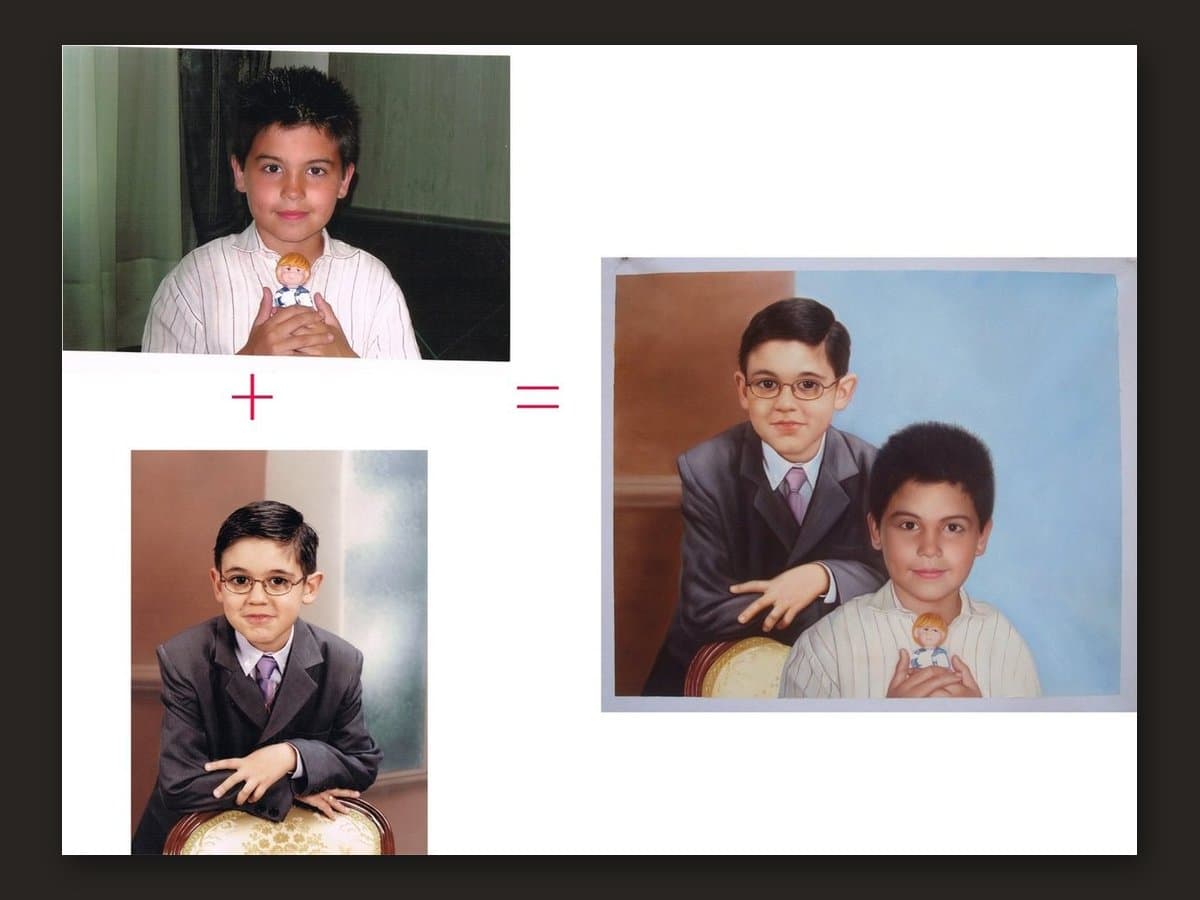
Merging photographs is routine: a relative who died before the family were ever in one frame, a face placed in a setting from another photograph, a dog added to a portrait of the people it lived with. Send each file and say in the notes which is the face reference and which is the scene, or the painter has to guess which likeness matters. There is no surcharge. The detail is in combining two photos into one portrait.
How to send it, and what happens next
The order form asks three things: the photograph, the subject, the size. Up to five photographs, ten megabytes each. You pay at checkout when you submit it.
There is no style picker and no style surcharge. A renaissance costume, a plain background instead of the kitchen, a lead edited out, winter turned into summer — write it in the notes field and it costs nothing extra.
We check every photograph within hours, 9am to 5pm Monday to Saturday (UK time). If it will not carry a likeness we say so then, and you can send another or have a full refund. Commissions run £220 to £549 by size, and an additional person or pet starts at £35.
The painting takes about three to four weeks, plus delivery. Before it ships you are sent a photograph of the finished painting, and if something is not right we keep painting until it is. It arrives rolled in a tube and unframed, to be framed locally.
Still unsure what photo to send for a portrait painting? Send several and say which you prefer. Telling you which will paint best costs nothing.
Frequently asked questions
Can you paint from a screenshot of a photo?
Usually, but it is the worst version of that photograph you could send: capped at your screen's resolution, re-compressed on the way to the camera roll, often cropped further. If the original is on the same phone, use it. If it lives inside an app you cannot export from, send the screenshot and we will say whether the face holds up at the size you want.
Can I photograph an old print instead of scanning it?
Yes, and done properly it beats a hurried low-setting scan. Lay the print flat in daylight, keep the camera parallel to it, and stay out of your own light. No flash — on a glossy print it burns a white hole in the middle. Take it out of the frame first, because glass adds reflections.
Is a passport photo good enough?
It passes every technical check: sharp, evenly lit, eye level, face large in the frame. The problem is the expression. Passport rules require a neutral mouth and a blank background, so the likeness comes out accurate and the painting looks like a document. Use it as a second reference for the features, with a warmer photograph for the pose.
Can you use a still from a video?
Sometimes. A frame pulled from 4K video is around eight megapixels and can work; a 1080p frame is about two, and video carries motion blur that lands in exactly the wrong place, which is the eyes. Send the still alongside any ordinary photograph of the same subject, and the painter uses the photograph for the features and the frame for the pose.
The only photograph I have is black and white. What do you need from me?
Colours, in writing: eye colour first, then hair, then skin tone, and the clothing if it matters. Better still, add any other photograph of that person in colour, whatever its age — the painter uses it for colour only, never the likeness. Without one the painter has to choose, and eye colour is what people notice fastest when it is wrong.